Session 10: Teaching the Self-Driving Car to Steer
Welcome back! 🚗 In this session, we’re going to teach the self-driving car how to steer using a computer brain! We’ll use a tool called PyTorch that helps computers learn from pictures and make smart choices.
What Will You Learn Today?
How to create a brain (called a model) that can understand pictures.
How to train the model to make good decisions, like steering the car.
How to see if the model is learning and improving.
How to save the model so we can use it later.
Note
Before we start, make sure you have PyTorch installed. If you don’t have it, you can install it using the command pip3 install torch (CPU). Visit https://pytorch.org/ for GPU installation instructions.
We’ll continue with previous session’s Jupyter Notebook where we collected data and preprocessed it. If you haven’t done that yet, please refer to the previous sessions.
Install TensorBoard
To watch the brain learn and improve, we’ll use a tool called TensorBoard. You can install it using the command pip3 install tensorboard.
Note
Training the model on CPU takes a long time. If no GPU is available, consider using Google Colab or share the dataset with us, and we’ll train the model for you.
Let’s get started! 🎉
Step 1: Create the Brain for the Car (The Model)
To teach the car how to drive, we need to build a brain that can look at pictures and decide how to steer. We call this brain a model. The model has different parts, like:
Eyes: These are special parts that help the brain see important things in pictures, like road lines.
Decision Maker: After seeing the picture, this part helps the brain decide what to do, like turning the wheel.
Here’s the code to create the brain:
import torch.nn as nn

class NvidiaModel(nn.Module):
    def __init__(self):
        super(NvidiaModel, self).__init__()
        self.conv1 = nn.Conv2d(3, 24, kernel_size=5, stride=2)
        self.conv2 = nn.Conv2d(24, 36, kernel_size=5, stride=2)
        self.conv3 = nn.Conv2d(36, 48, kernel_size=5, stride=2)
        self.conv4 = nn.Conv2d(48, 64, kernel_size=3)
        self.conv5 = nn.Conv2d(64, 64, kernel_size=3)
        self.fc1 = nn.Linear(64 * 1 * 18, 100)
        self.fc2 = nn.Linear(100, 50)
        self.fc3 = nn.Linear(50, 10)
        self.fc4 = nn.Linear(10, 1)

    def forward(self, x):
        x = nn.functional.elu(self.conv1(x))
        x = nn.functional.elu(self.conv2(x))
        x = nn.functional.elu(self.conv3(x))
        x = nn.functional.elu(self.conv4(x))
        x = nn.functional.elu(self.conv5(x))
        x = x.reshape(-1, 64 * 1 * 18)  # Reshape data for decision-making
        x = nn.functional.elu(self.fc1(x))
        x = nn.functional.elu(self.fc2(x))
        x = nn.functional.elu(self.fc3(x))
        x = self.fc4(x)
        return x
This is our computer brain! Each part helps the car see and make decisions about how to steer.
Explaining the Code in More Detail 🤔
Let’s look closely at some important parts of the code:
The `NvidiaModel` Class (The Brain)
The NvidiaModel class is the brain of the car, where the images of the road are processed and decisions are made. Here’s what happens inside it:
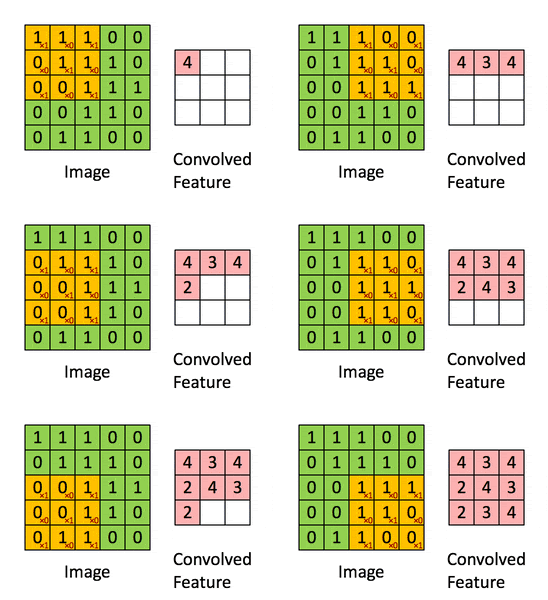
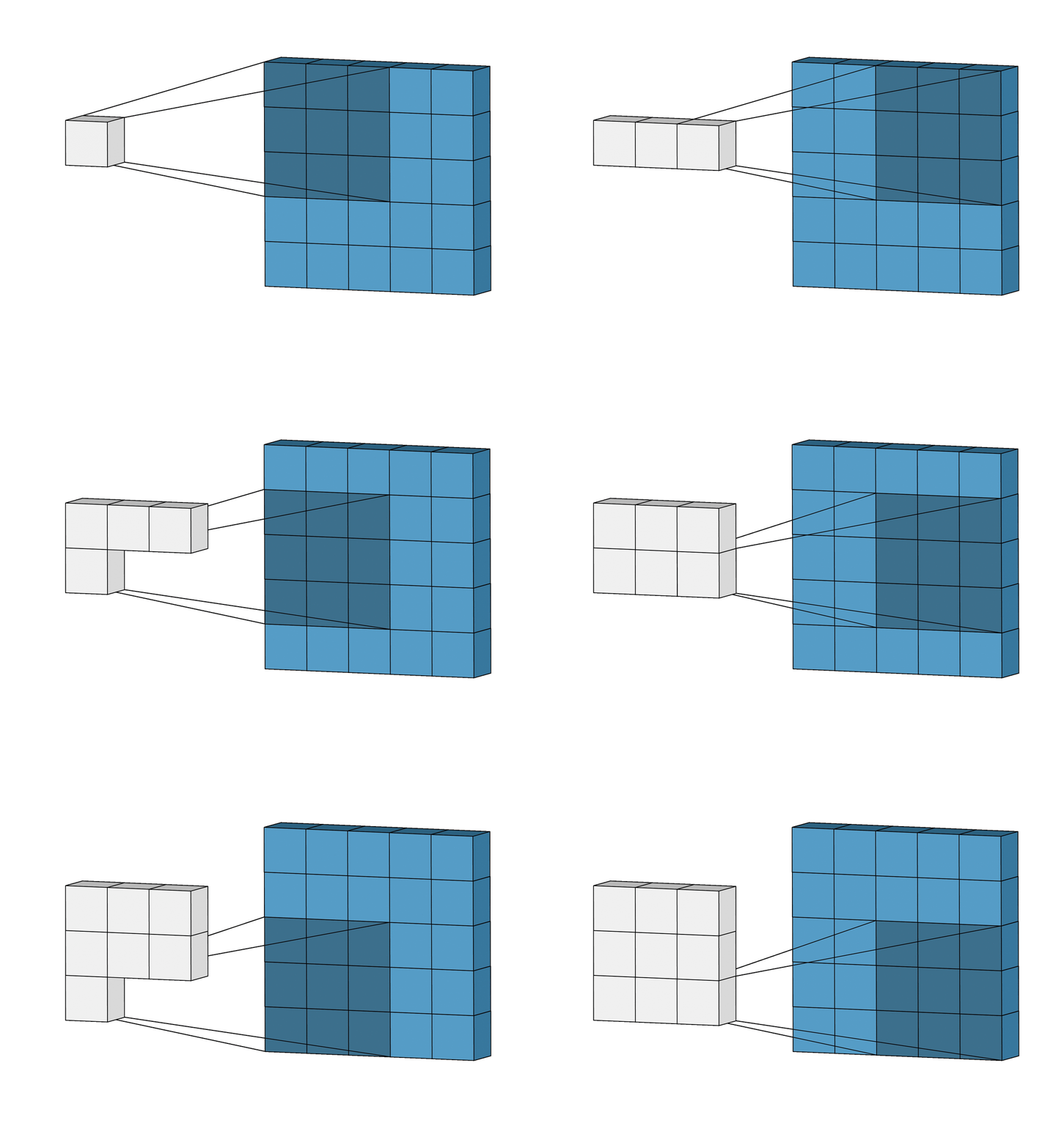
Convolutional Layers (`conv1`, `conv2`, `conv3`, `conv4`, `conv5`): These are like the car’s “eyes” and help the brain see the important features in the image. They filter the image to detect edges, lines, and other key elements of the road.
`kernel_size`: This tells the brain how big the part of the image it will focus on should be (like looking at a piece of the image at a time).
`stride`: This determines how much the brain moves its focus to the next part of the image.
|
|
Image Source: State-of-the-Art Convolutional Neural Networks Explained - DenseNet
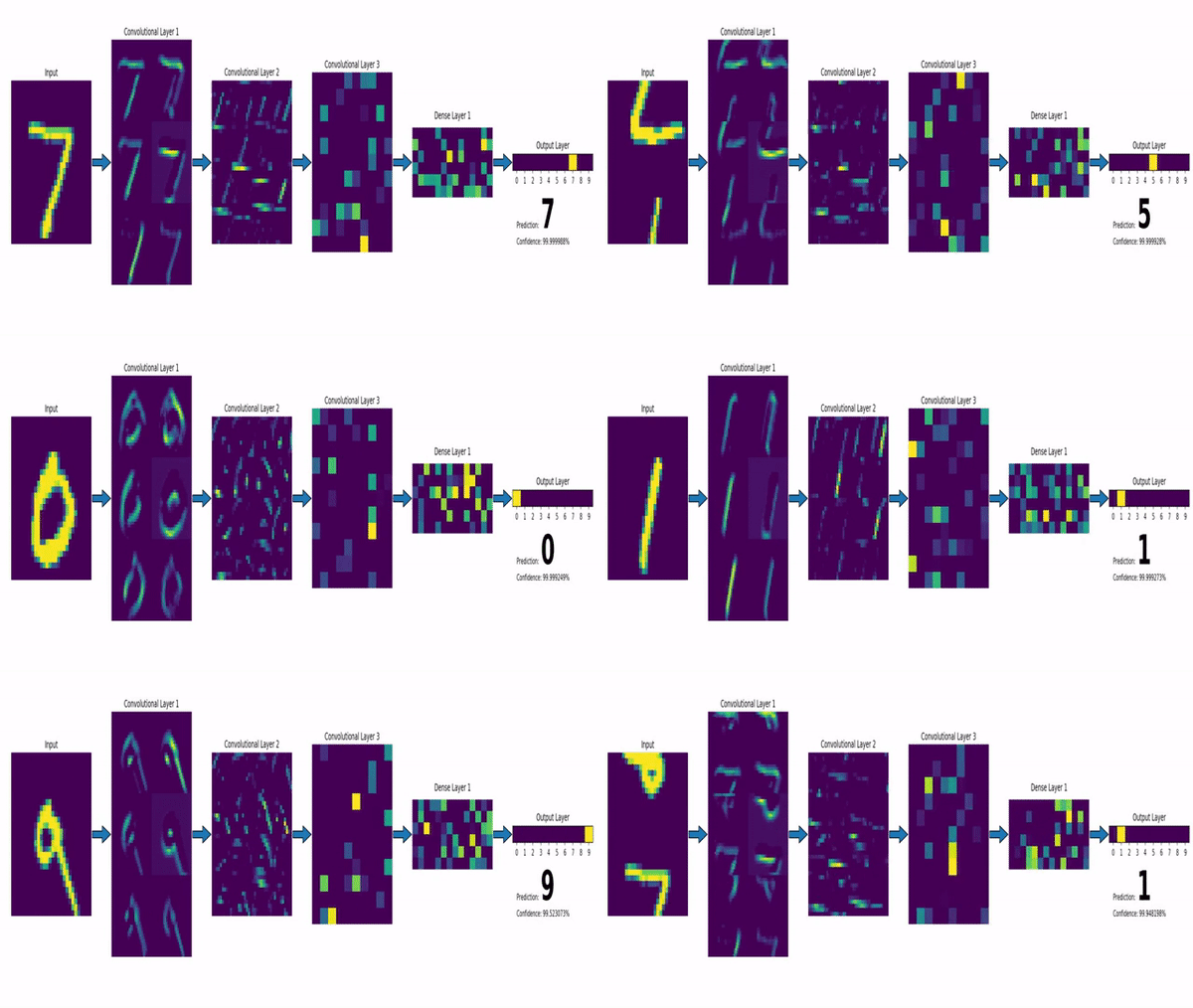
Fully Connected Layers (`fc1`, `fc2`, `fc3`, `fc4`): These layers are like the brain’s “thinking” process, where the brain figures out how to steer the car based on what the eyes saw.
After the image is processed by the convolutional layers, it is “flattened” into a single long list of numbers. This is done in the reshape step.
Then, the fully connected layers make decisions based on that flattened information.
The `forward` Function (How the Brain Works)
The forward function is where all the work happens. It processes the image and makes the decision to steer the car.
Activation Function (ELU): Inside the forward function, we use the ELU (Exponential Linear Unit) activation function. This is a mathematical trick that helps the brain learn faster and make better decisions. It makes sure that all the numbers in the brain are either positive or small negative values, which helps the brain learn in a stable way.
—
Step 2: Teach the Brain to Steer (Training the Model)
Now, we need to teach the brain how to steer by showing it lots of pictures of roads and how the car should steer. The brain will try to learn from these pictures, like this:
We show it a picture.
The brain guesses how to steer.
We tell it if it was right or wrong.
The brain learns from its mistakes and gets better!
Here’s the code to teach the brain:
import torch
from torch.utils.tensorboard import SummaryWriter
import torch.optim as optim

device = torch.device("cuda:0" if torch.cuda.is_available() else "cpu")

# Create the brain
model = NvidiaModel()
model = model.to(device)

# Choose how the brain will learn
criterion = nn.MSELoss()  # This helps the brain know how wrong it was.
optimizer = optim.Adam(model.parameters(), lr=1e-3)  # This helps the brain learn step by step.

# Set up a tool to watch the brain learn
writer = SummaryWriter()

num_epochs = 20  # We will teach the brain for 20 turns

batch_size = 100  # The brain will learn in groups of 100 pictures at a time

# Total number of batches for training and validation
total_train_batches = len(X_train) // batch_size
total_valid_batches = len(X_valid) // batch_size

# Training the brain
for epoch in range(num_epochs):
    model.train()  # Tell the brain it's time to learn!
    running_loss = 0.0
    for i, (inputs, labels) in enumerate(batch_generator(X_train, y_train, batch_size, 1, total_train_batches), 1):
        inputs = np.transpose(inputs, (0, 3, 1, 2))  # Change image shape for the brain to understand
        optimizer.zero_grad()  # Prepare the brain to learn
        inputs_tensor = torch.tensor(inputs, dtype=torch.float32).to(device)
        labels_tensor = torch.tensor(labels, dtype=torch.float32).to(device)
        outputs = model(inputs_tensor)  # The brain guesses how to steer
        loss = criterion(outputs, labels_tensor.unsqueeze(1))  # How wrong was the guess?
        loss.backward()  # The brain learns from its mistake
        optimizer.step()  # The brain gets smarter after every mistake
        running_loss += loss.item()

    # Calculate average training loss for the epoch
    train_loss = running_loss / len(X_train)

    # Validation step to test how well the brain learned
    model.eval()  # Tell the brain to stop learning for now
    with torch.no_grad():  # Don't need to learn during validation
        valid_loss = 0.0
        for inputs, labels in batch_generator(X_valid, y_valid, batch_size, 0, total_valid_batches):
            inputs = np.transpose(inputs, (0, 3, 1, 2))
            inputs_tensor = torch.tensor(inputs, dtype=torch.float32).to(device)
            labels_tensor = torch.tensor(labels, dtype=torch.float32).to(device)
            outputs = model(inputs_tensor)
            loss = criterion(outputs, labels_tensor.unsqueeze(1))
            valid_loss += loss.item()
        valid_loss /= len(X_valid)

    # Print the progress for the brain
    print(f'Epoch [{epoch+1}/{num_epochs}], Train Loss: {train_loss:.4f}, Valid Loss: {valid_loss:.4f}')

    # Log the progress to TensorBoard
    writer.add_scalar('Loss/train', train_loss, epoch)
    writer.add_scalar('Loss/valid', valid_loss, epoch)

# Save the brain so we can use it later
torch.save(model.state_dict(), 'model.pth')

# Stop watching the brain learn
writer.close()
Step 3: How We Teach the Brain to Drive
Training: We show the car lots of pictures of roads and steer it, so the brain can learn the connection between the pictures and the steering. Loss: The “loss” tells the brain how wrong it was. The brain tries to lower the loss each time, getting smarter. Epochs: Each time we show the brain a set of pictures, it’s called an “epoch”. The more epochs, the better the brain gets at steering.
Step 4: Watch the Brain Learn (TensorBoard)
While the brain is learning, we can watch how it’s doing by using TensorBoard. It helps us see if the brain is getting better or worse.
We log the train loss (how wrong it is on the training pictures) and the validation loss (how wrong it is on new pictures). We want both numbers to get smaller!
ncnn model
We can also convert the PyTorch model to an ncnn model for running on small devices like Raspberry Pi. We use the ncnn library to convert the model, so that we can run it on CPU.
!pip3 install ncnn pnnx

import pnnx

opt_model = pnnx.export(model, "ncnn_model.pt", inputs_tensor)
Summary
In this session, we:
Created a brain (model) for the self-driving car.
Taught the brain to steer by showing it pictures.
Watched the brain learn and improve.
Saved the brain so we can use it later.
Next, we’ll use this trained brain to make the car drive! 🚗💨